Curate
Curate app icon

Your media, on your terms.你的收藏,由你做主。

A personal media journal for iOS. Catalog the books, movies, TV shows, and performances you've experienced — with your own ratings, statuses, tags, and dated notes, kept on your device and synced through your own iCloud.一款记录阅读、观影与演出体验的私人日记 App,专为 iOS 打造。记录你读过的书、看过的电影和剧集、观赏过的演出——用你自己的评分、状态、标签和带日期的笔记,一切都保存在你的设备上,并通过你自己的 iCloud 同步。 A personal media journal for iPadOS. Explore your library with poster grids that expand gracefully across the screen, and keep journals, notes, and progress comfortably in view. Keyboard shortcuts and menu-bar commands are there when you want to move even faster.一款记录阅读、观影与演出体验的私人日记 App,专为 iPadOS 打造。自适应海报网格会随屏幕从容展开,让资料库、日志、笔记和进度始终清晰可见。需要更快操作时,键盘快捷键和菜单栏命令也随手可用。

Your library你的资料库

Built around your library, not a database's.以你的体验为中心。

Curate isn't a catalog of what other people think you should log — it's a record of what you actually experienced:
the things you start, finish, return to, and want to remember.
在 Curate,记录的是你自己的经历:
开始过的、完成过的、再次重温的,以及想要记住的一切。

Home主页

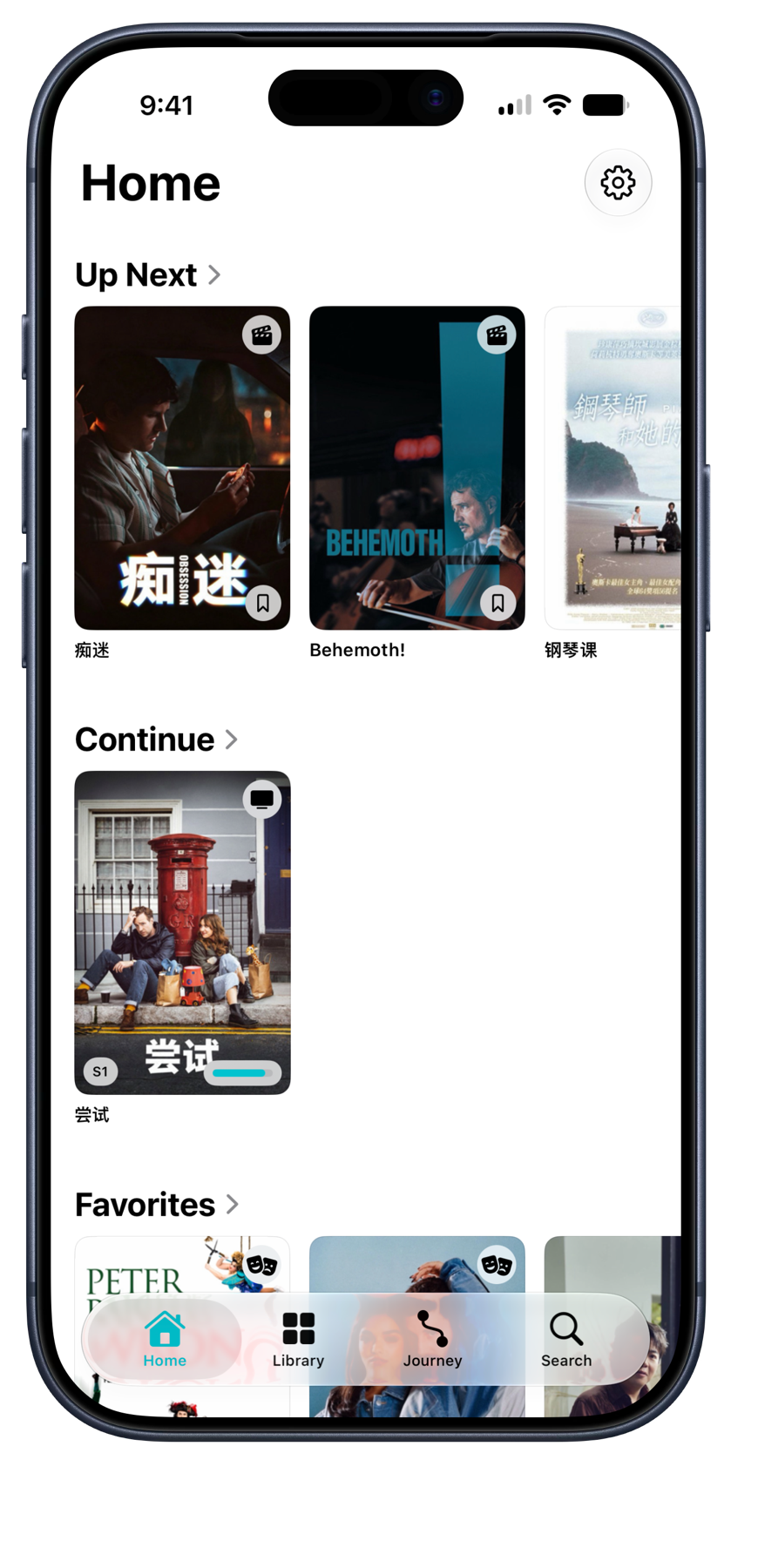
Rule-built shelves surface what matters now: Up Next, Continue, Favorites, On This Day, and daily Discover picks. Reorder them, hide what you do not need, and make Home feel like yours. 主页为你整理出“待体验”“进行中”“最爱”和“历史上的今天”,也带你重新发现收藏中的内容。你可以调整顺序,隐藏不需要的栏目。

Library资料库

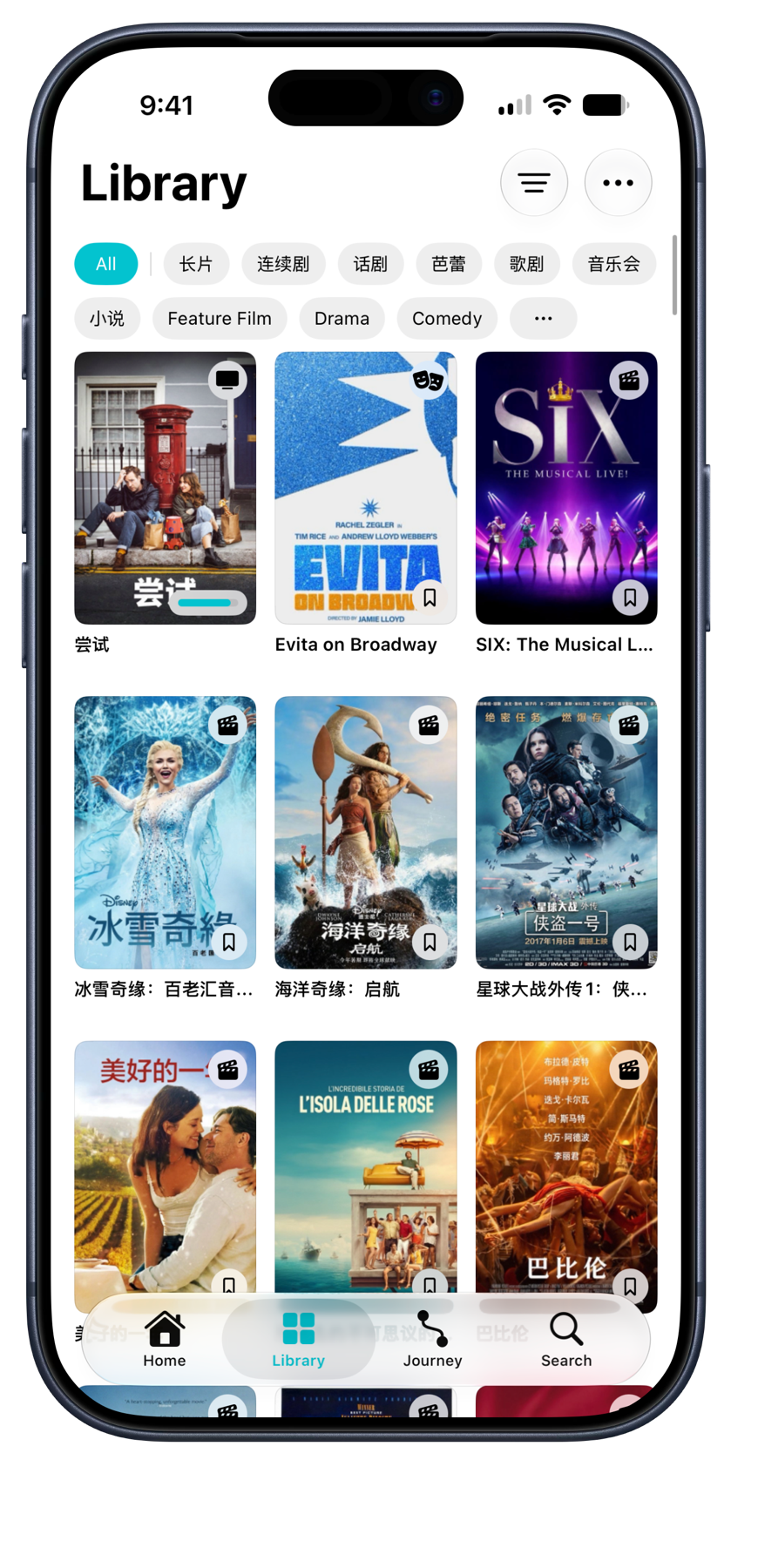
Posters lead, words follow. Each cover carries small badges that tell its story at a glance — a progress bar mid-season, a date when finished, stars underneath. Tap one and its page opens straight from the cover. 海报是主角。每张封面都带着讲述自己故事的小角标——看到一半是进度条,看完是完成日期,评分就在标题下方。轻点海报,它的页面便从封面展开。

Filter, sort, organize筛选、排序、整理

Combine status, type, rating, and tag filters to find what you want. Sort the way you think, group by status, and delete several items at once. 自由组合状态、类型、评分和标签筛选,找到想看的内容。按你的思路排序、按状态分组,也可以一次删除多个条目。

Artwork sets the tone让封面营造氛围

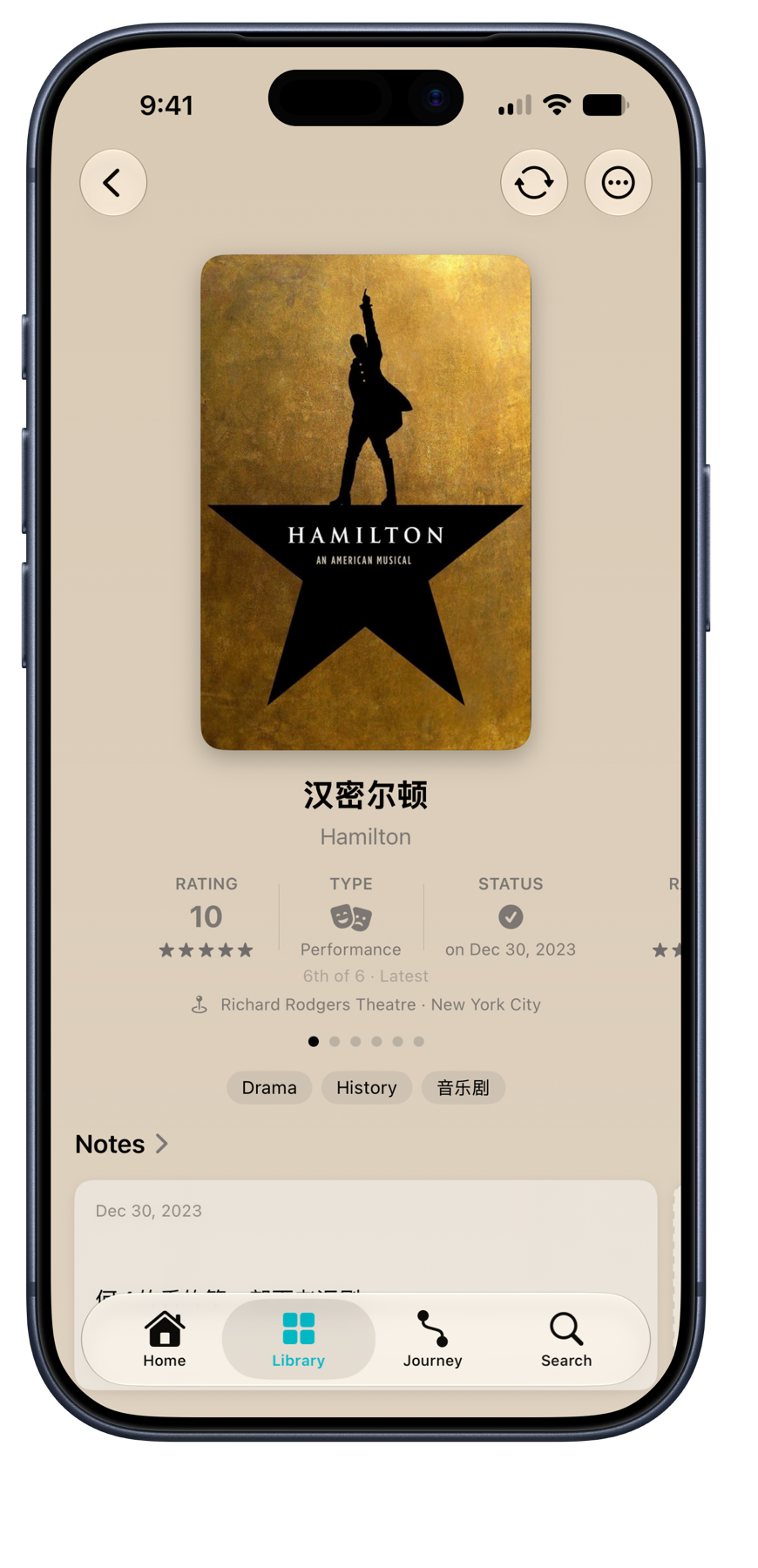
Open an item and its poster gently colors the surrounding detail view. The effect gives every entry a sense of place, while the artwork, your notes, and the information you came for stay in focus. 打开条目,详情页会融入封面的色彩,让封面、笔记和重要信息自然呈现。

Journey历程

A chronological journal of what you finished, grouped by the day you experienced it. It turns a completed list into a record of your time — and gives every return visit its own place. 按体验日期归类的完成日志。它把一张已完成清单变成你时间的记录,也让每一次重温都拥有自己的位置。

Anything can belong任何事物都有位置

Create your own media type — name it, give it an icon and progress unit, and choose the details it tracks. 创建属于你的媒体类型——命名、选择图标和进度单位,并决定它需要记录哪些细节。

Make it yours让它成为你的

Find it, then make it yours.找到它,然后变成你的记录。

Start with a search when it saves time, then keep the details that matter to you — including the ones no catalog could know. 需要时从搜索开始,然后保留对你重要的细节——也包括只有你自己知道的经历与感受。

Search & add搜索与添加

Find books, films, shows, and more from online catalogs, with a cover, metadata, and useful tags ready to review. Or add anything completely by hand. 从在线资料库查找书籍、电影、剧集等内容,封面、作品信息和实用标签都会预先准备好供你确认;也可以完全手动添加任何内容。

Notes that keep the moment留住当下的笔记

Add dated journal entries with optional titles, edit the date when a memory belongs elsewhere, and pin the notes you want to find again. Your thoughts live beside the item, not in a separate notebook. 为笔记记录日期,也可以加上标题、修改日期来记下过去的经历,或置顶想再次找到的笔记。你的想法就留在条目身边,而不是另一本笔记里。

Details you control由你掌控的细节

Edit titles, creators, genres, dates, duration, locations, summaries, and more in the same thoughtful layout where you read them. No rigid database fields standing in the way. 在阅读信息的同一套精心设计的布局中编辑标题、创作者、类型、日期、时长、地点、简介等内容。按你的需要编辑和整理每一项信息。

Covers and tags with character有个性的封面与标签

Choose a cover from your camera roll, Files, or camera; crop it your way; or use a title-based cover. Organize everything with flexible tags and groups that work across your whole library. 从照片、文件或相机选择封面,按你的方式裁切,或使用基于标题生成的封面。用灵活的标签和分组整理一切,并在整个资料库中通用。

One library, two languages一个资料库,两种语言

Use Curate in English or Chinese, and choose the language of metadata and genre tags separately. Items keep their original titles alongside your language, and Chinese book search draws on Chinese catalogs. 以英文或中文使用 Curate,作品信息与题材标签的语言还可分别选择。条目会同时保留原名和所选语言的标题,中文图书搜索也有中文资料源支持。

More than a checkmark不只是一个勾选

Every season belongs to the story.每一季都属于你的故事。

A show is not one finished box. Neither is a book or film you return to years later. Curate keeps the details that make each experience distinct. 一部剧不该只有一个「已完成」的方框;多年后重读的书和重看的电影也是如此。Curate 保留让每次体验与众不同的细节。

TV seasons, properly tracked认真追踪每一季剧集

Give every season its own status, rating, progress, and notes. Browse a show as one clean entry or open its seasons individually when you want the full picture. 每一季都拥有自己的状态、评分、进度和笔记。浏览时可将整部剧视为一个简洁条目,需要全貌时也可逐季展开。

Return without rewriting history重温,不重写历史

Rewatch, reread, or revisit anything without replacing the first time. Each pass keeps its own completion date and rating, side by side with every other memory. 重看、重读或再次体验任何内容,都不会覆盖第一次。每一遍都保留自己的完成日期和评分,与其他记忆并列存在。

Progress with a finish line有终点的进度追踪

Track pages, episodes, or a simple percentage. Reaching the end can complete the item and invite you to rate it, so the journal stays current without extra steps. 追踪页数、集数或简单的百分比。到达终点时可自动完成条目并邀请你评分,让日志无需额外步骤也能保持最新。

The details around the moment围绕当下的细节

Keep the date, place, and personal context that turn a finished item into a memory you can return to. 记下日期、地点和当时的经历,让一个完成的条目成为随时可以回看的记忆。

On this day历史上的今天

An On This Day shelf brings back what you finished on today's date in years past — and since every rewatch keeps its date, the anniversaries multiply as your story grows. 「历史上的今天」书架会带回你在往年今天完成的作品——每一次重温都保留自己的日期,随着故事延续,值得纪念的日子也会越来越多。

Native by design原生设计

Built for iOS, not just on it.为 iOS 而生。 Built for iPadOS, not just on it.为 iPadOS 而生。

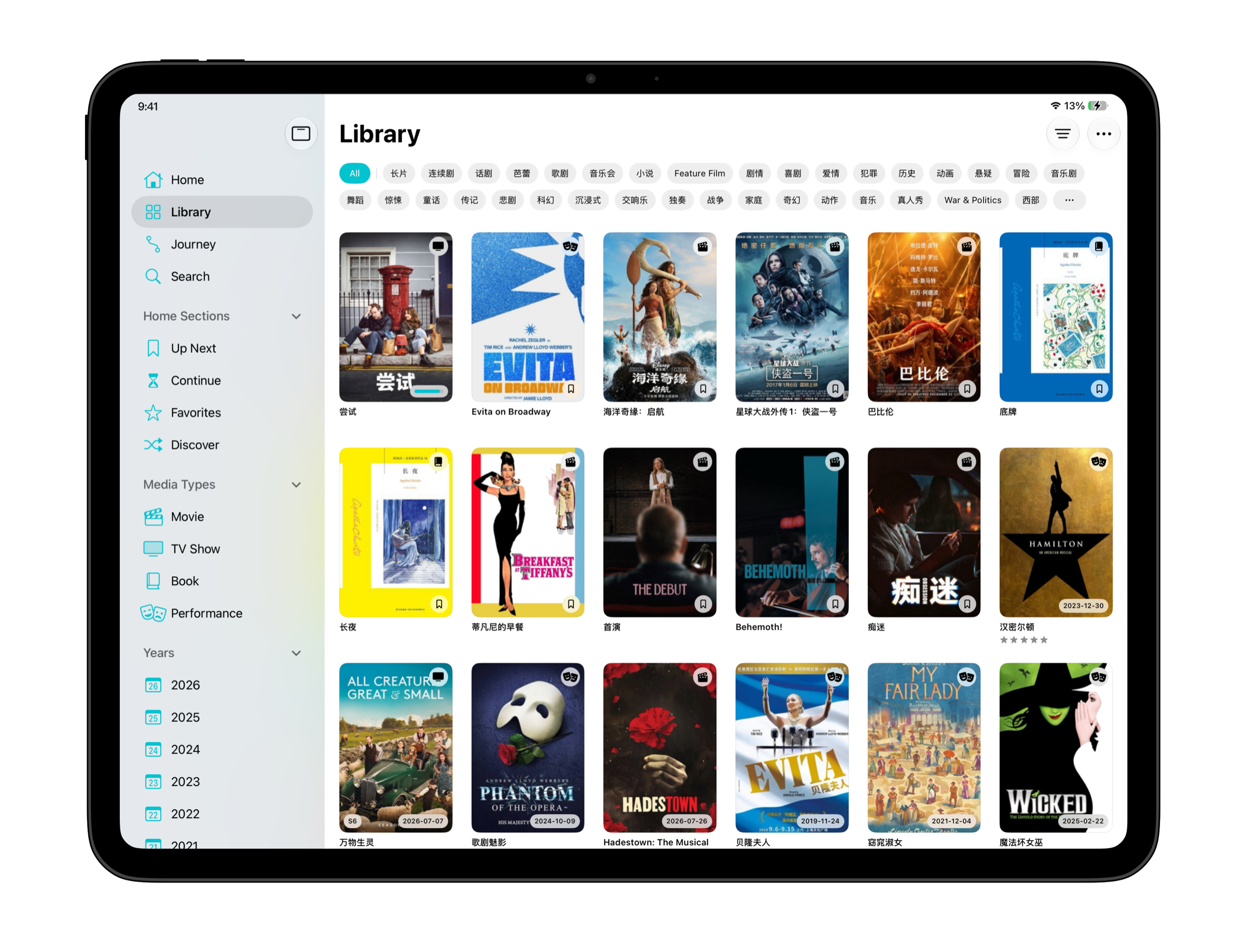
SwiftUI under the hood, Liquid Glass on the surface — fluid animation, native menus, sheets, and pickers throughout, so it feels like part of the system instead of a guest on it.底层采用 SwiftUI,界面拥抱 Liquid Glass 设计语言——流畅连贯的动画、原生菜单、弹出面板和选择器贯穿始终,如同系统本身的一部分,而非外来的访客。 This isn’t a stretched iPhone layout. Curate takes advantage of iPadOS with a dedicated sidebar, roomier poster grids and shelves, and space to browse your collection while keeping the details that matter in view. Keyboard shortcuts and menu-bar commands make moving through it even quicker.这不是被拉伸的 iPhone 布局。Curate 充分利用 iPadOS:专属侧边栏、更宽敞的海报网格与书架,以及足够的空间让你浏览收藏时仍能看见重要细节。键盘快捷键和菜单栏命令让浏览与操作更加迅速。

Motion that stays fluid流畅,自然而然 A sidebar that stays close始终触手可及的侧边栏

Subtle, responsive animation gives every transition a sense of continuity, so the app feels calm and natural in your hand.细腻、灵敏的动画让每一次切换保持连贯,在手中使用时始终自然从容。 Keep Home, Library, Journey, Search, and the parts of your collection you use most within easy reach.主页、资料库、历程、搜索,以及最常使用的收藏入口,都始终触手可及。

Controls you already know你早已熟悉的界面 A wider view更开阔的视野

Menus, sheets, and pickers behave the way they do everywhere else on iPhone — familiar from the first tap.菜单、弹出面板和选择器都遵循 iPhone 上熟悉的交互方式,从第一次点按起就自然顺手。 Roomier poster grids and shelves let you browse more of your library at once, while the details that matter remain in view.更宽敞的海报网格与书架让你一次浏览更多收藏,同时仍能看见重要的细节。

Your data is yours你的数据属于你

Curate has no accounts and no analytics — your library is never something we hold or study. And it is never leverage either: exporting the whole thing, as often as you like, stays free forever, with or without a subscription. Curate 没有账户,也没有任何分析追踪——你的资料库不由我们保管,也不会被我们研究。它更不会成为筹码:随时导出全部内容,次数不限,无论是否订阅都永久免费。

Made for the moment为当下而设计 Keyboard-ready随时可用的键盘操作

Thoughtful controls and layouts make updating progress, adding a note, or finding something in your library feel immediate.精心设计的控件与布局,让更新进度、添加笔记或查找资料库内容都能即时完成。 Keyboard shortcuts help you move through Curate and act on your collection without taking your hands away from the keys.键盘快捷键让你无需离开键盘,就能在 Curate 中浏览并操作自己的收藏。

A focused place专注的一方空间 Menus with context恰到好处的菜单

The interface keeps attention on your library and your memories, with a calm visual language that stays out of the way.界面将注意力留给你的资料库与回忆,以平静的视觉语言默默退居其后。 A full menu bar puts common actions and item-specific commands where you expect them, making the larger canvas feel genuinely productive.完整的菜单栏把常用操作和条目相关命令放在你熟悉的位置,在更大的屏幕上,浏览和整理都更顺手。

Made to welcome everyone为每一个人而设计

Curate is designed with accessibility in mind: clear hierarchy, readable type, familiar controls, and generous touch targets help keep every part of your library comfortable to explore. Curate 从一开始便将无障碍体验纳入考量:清晰的信息层级、易读的文字、熟悉的控件和充裕的点按区域,让每个人都能舒适地浏览自己的资料库。

Simple pricing.简单透明的定价。

Start free. Upgrade whenever your library outgrows it. 免费开始使用,当资料库超出限额时随时升级。

Free免费

  • Full journal & journey view完整的日志与历程视图
  • Ratings, statuses, tags & notes评分、状态、标签和笔记
  • Online search & metadata在线搜索与作品信息
  • Data export & backup数据导出与备份
  • iCloud synciCloud 同步
  • Library: up to 20 items资料库:最多 20 个条目
  • Rewatches & rereads重看与重读
  • Custom media type自定义媒体类型
  • Future features后续新功能

Curate Pro

  • Full journal & journey view完整的日志与历程视图
  • Ratings, statuses, tags & notes评分、状态、标签和笔记
  • Online search & metadata在线搜索与作品信息
  • Data export & backup数据导出与备份
  • iCloud synciCloud 同步
  • Library: unlimited items条目数量不限
  • Rewatches & rereads重看与重读
  • Custom media type自定义媒体类型
  • Future features后续新功能
  • Flexible subscription灵活订阅

A 7-day free trial, then 7 天免费试用,之后按所选方案订阅

Monthly月付
$0.99¥6/mo/月
Yearly年付
$9.99¥58/yr/年
Save 16%省 19%

Curate Pro Lifetime终身版

  • Full journal & journey view完整的日志与历程视图
  • Ratings, statuses, tags & notes评分、状态、标签和笔记
  • Online search & metadata在线搜索与作品信息
  • Data export & backup数据导出与备份
  • iCloud synciCloud 同步
  • Library: unlimited items条目数量不限
  • Rewatches & rereads重看与重读
  • Custom media type自定义媒体类型
  • Future features后续新功能
  • One-time purchase一次性购买
Lifetime终身版
$19.99¥128
One-time purchase一次性购买

Purchases and subscriptions are handled entirely by Apple. Manage or cancel anytime in Settings → Apple Account → Subscriptions. See the privacy policy for details. 购买与订阅完全由 Apple 处理。你可以随时在「设置 → Apple 账户 → 订阅」中管理或取消。详情请见隐私政策

Built with the latest technologies.以最新技术打造。

Curate is built on the newest iOS frameworks and design language, and requires iOS 26 or later. Development is active, and improvements arrive all the time.Curate 基于最新的 iOS 框架与设计语言打造,需要 iOS 26 或更高版本。开发正在积极进行,新的改进会不断到来。 Curate is built on the newest iPadOS frameworks and design language, and requires iPadOS 26 or later. Development is active, and improvements arrive all the time.Curate 基于最新的 iPadOS 框架与设计语言打造,需要 iPadOS 26 或更高版本。开发正在积极进行,新的改进会不断到来。

Private by default.默认私密。

No Curate account or analytics. Your library stays on your device and syncs through your own iCloud, without passing through Curate servers. Online search uses a separate relay, explained in our privacy policy. 无需 Curate 账户,没有分析追踪。你的资料库保存在设备上,通过你自己的 iCloud 同步,不经过 Curate 的服务器。在线搜索使用独立的中转服务,详情见隐私政策。